Description
Embedded retaining walls
We are committed to ensuring that your information is secure. In order to prevent unauthorised access or disclosure we have put in place suitable physical, electronic and managerial procedures to safeguard and secure the information we collect.
All data is stored in secure electronic systems accessible only to Oasys staff with both valid network login credentials and specific authorisation to access the system. Our systems further limit data access by role to ensure data is available only to those who have a specific need to see it.
If at any point you suspect or receive a suspicious communication from someone suggesting they work for Oasys or a website claiming to be affiliated with Oasys, please forward the communication to us or report the incident by email to [email protected] or in writing to Oasys, 8 Fitzroy Street, London, UK, W1T 4BJ as soon as possible.
Data Security Notice Updated 27th February 2020
[ top ]
The contents of this web site are protected by copyright and other intellectual property rights under international conventions. No copying of any words, images, graphic representations or other information contained in this web site is permitted without the prior written permission of the webmaster for this site.
Oasys accepts no responsibility for the content of any external site that links to or from this site.
[ top ]
The full conditions of purchase and maintenance for all Oasys desktop software are set out in the Oasys Software Licence and Support Agreement.
The full conditions of purchase and maintenance for Oasys Gofer and Oasys Giraphe are set out in the Gofer SaaS Agreement and the Giraphe SaaS Agreement.
All prices are subject to TAX at the current rate.
Prices and specifications are subject to change without notice – please ask for a written quotation.
Although every care has been taken to ensure the accuracy of all information contained herein, the contents do not form or constitute a representation, warranty, or part of any contract.
Oasys keeps copies of all superseded versions of its terms and conditions.
Support and maintenance is included with all subscription licences for their full duration.
Annual maintenance contracts are available for software under a perpetual licence, prices are based on a percentage of the most recent list price.
This service includes:
[ top ]
View available cookies policies below:
[ top ]

Flexible retaining structures are typical features in projects where temporary works are necessary, such as cofferdam design, and Oasys Frew enables engineers to analyse the behaviour of such. As a key precursor element to build new structures such as bridges or steep embankments adjacent to site boundaries or sensitive assets, either forming cuttings or via bottom-up construction Frew assists engineers make informed design decisions about flexible retaining wall structures.
Civil engineers and geotechnical engineers responsible for routine design of flexible retaining wall structures use Oasys Frew as part of their toolbox, addressing the need of calculations that cannot easily be replicated using spreadsheets. Frew provides users with a validated, robust and user-friendly method of calculations, ensuring acceptable and appropriate QA and QC standards are met.
A comprehensive package on its own, when used alongside Oasys PDisp and Oasys XDisp, Frew allows geotechnical engineers to produce more advanced and comprehensive models and make informed design decisions.
You must be logged in to access this product's trial download, please login or register.
Frew uses the COM (Component Object Model) interface in a number of innovative ways such as carrying out sensitivity analyses and automating outputs to produce comparison graphs. COM interface creates data objects that allow external programs to pass information and instructions to and from the Geotechnical programs. COM has already been used in research and it speeds up the analysis in geotechnical projects.
Application Specialist, Zeena Farook, hosted a webinar introducing the COM interface, you can watch the webinar here.
As well as an introduction into how to access and apply the COM interface, two Arup engineers, Mark Skinner and Matthew Brown, demonstrate how they have applied the COM interface to their design analyses in Oasys software, Alp and Greta.
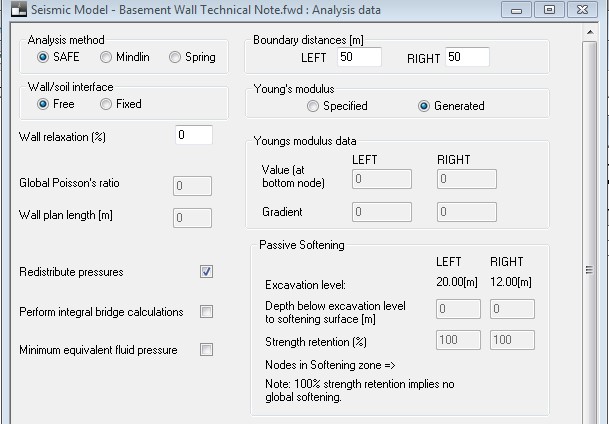
Frew Analysis Options
“Safe” flexibility method
Soil is represented as an elastic solid with the soil stiffness matrices being developed from pre-stored stiffness matrices calculated using the “Safe” finite element program. This method is ideal for soil with linearly increasing stiffness with depth.
Mindlin method
The Mindlin method is perfect when soil is represented as an elastic solid with the soil stiffness based on the integrated form of the Mindlin Equations. With this method you can model a wall of limited length in a plan. Ideal for when soils have constant stiffness with depth.
Subgrade reaction method
The method to be used when soil is represented as a series of non-interactive springs.
‘Memory’ feature
Frew allows engineers to calculate the required wall embedment length using a choice of methods and offers quick problem setup and revision with a unique stage ‘memory’ feature, increasing the ease of usability.
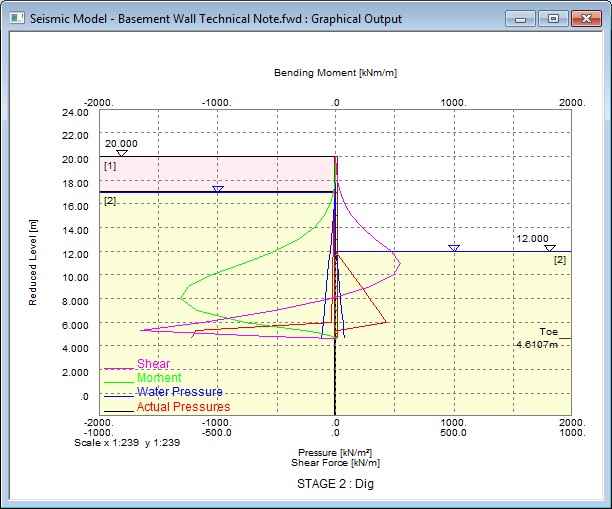
Frew Stability Output
Frew models more complex features, including:
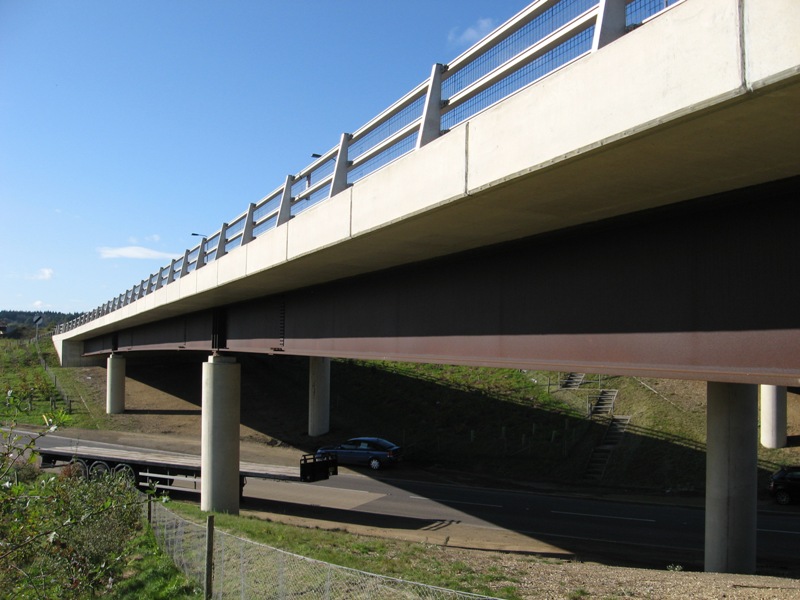
Integral bridge analysis (Image courtesy of TataSteel)
Advanced input features include the batch testing feature which allows you to compare the performance of the retaining wall at different toe levels. Partial factors including Eurocode 7 can be applied with ease.
Model Wizard and Graphical Input
The model wizard automatically generates nodes based on the geometrical data, the graphical input view will then show a single soil zone extending the full depth of the problem. The wizard is designed to make the setup of models easier than ever before, ensuring that basic settings and global data can be entered at any point during analysis.
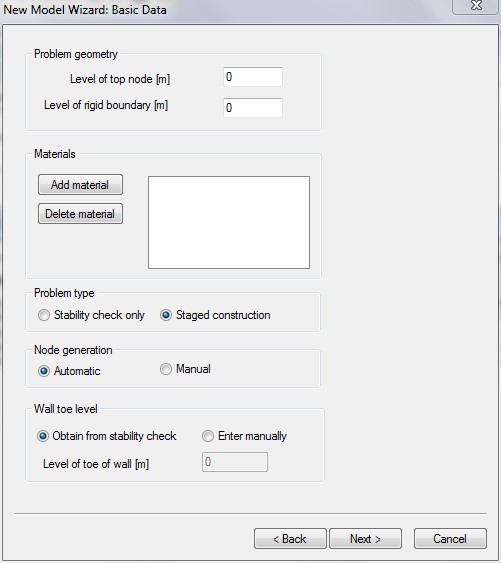
Easy to use wizard
Partial Factors Input
You can specify partial factors to be applied to material properties or surcharge input parameters. Factors include EC7, CIRIA C580 and EN1997-1:2004.
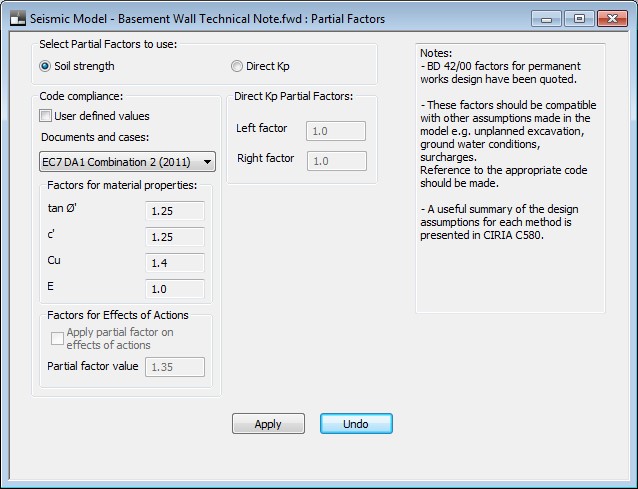
Frew EC7 Input
Batch Analysis for Multiple Toe Levels
Frew allows you to specify the number of toe levels required and by doing this, you can create a number of files with wall toe depths at different levels. This allows you to compare the outputs and performance of the walls at different toe depths.
Graphical and Tabular Outputs
Extensive graphical and tabular output options allow you to investigate further calculations used within designs and as images in reports. The tabular outputs can be printed by stage or exported to excel for analysis. The graphical outputs can be scaled and specific outputs can be selected (such as displacements or bending moments). The envelope of results can be viewed with ease. The results can be exported to Microsoft Excel for post-processing and has undergone extensive verification with site data and FE. Discussions are presented in a number of papers and Ciria C580.
Frew Stability Output
The Oasys Geotechnical Suites bring together all the tried and tested Oasys Geotechnical tools into a single heavily discounted bundle, 25% cheaper than purchasing the same programs individually.
Find out more »The trials are limited for 14 days only, and there is no functional limitation. During the evaluation period you will only be able to use the software for test purposes and not for commercial paid work, and for the duration we will support you to get the most out of your test. System requirements can be found in the FAQs.
All we ask from you are some details so we can contact you to issue you with the installation file.
Once you submit your details, a customer service agent will contact you and provide the free trial installer.
Existing customers who are fully maintained can download the latest versions of their software on demand from their personalised customer licensing portal.
Your login ID and Password for the portal is not the same as your website account. You can find your login details in your purchase confirmation email. Alternatively you can request for your login details to be sent to you by emailing [email protected].
We offer a limited-duration trial license for you to assess the suitability of our products for your projects.
During the evaluation period you will only be able to use the software for test purposes and not for commercial paid work, and for the duration we will support you to get the most out of your trial.
All we ask from you is some details so we can decide whether you are eligible for a trial.
Compatible with most modern day Windows operating systems.
The full conditions of purchase and maintenance are set out in the Oasys Software Licence and Support Agreement. All prices are subject to TAX at the current rate.
Prices and specifications are subject to change without notice – please ask for a written quotation.
Although every care has been taken to ensure the accuracy of all information contained herein, the contents do not form or constitute a representation, warranty, or part of any contract.
By completing and submitting this form you consent to Oasys Limited storing and processing the personal data you have provided. We will use this information to keep you updated about the products requested for customer service and sales analysis. We do not pass your details to third parties to use. For more information visit our privacy policy. You may opt-out at any time by emailing [email protected].
USD $2,488.80 – USD $29,865.60
Oasys Frew is a tool developed to enable engineers to analyse the behaviour and inform the design of flexible retaining wall-like structures, and is a core component of our Geotechnical Suite Pro and Geotechnical Suite bundles.
Embedded retaining walls
| Select your version | Frew, Geotechnical Suite, Geotechnical Suite Pro |
|---|---|
| Select your licence | Standalone, Network Floating, Network Floating International |
| I would like to | 12 months Subscription (Pay annually), 36 months Subscription (Pay annually) |
Oasys Frew is also available as part of the Oasys geotechnical and suites that bring together complimentary tools in discounted packages
Standalone licenses are locked to an individual machine, but transferable by the user to another machine manually. Ideal for single users. Restricted to use within the country stated in the End User address submitted by Licensee to Oasys at the time of purchase.
Network Floating licenses can be activated on any number of machines, however you can only concurrently use the number of licences that you have purchased. Ideal for users requiring more flexibility or when working as part of a team. Restricted to use within the country stated in the End User address submitted by Licensee to Oasys at the time of purchase.
Network Floating International licenses can be activated on any number of machines, however you can only concurrently use the number of licences that you have purchased. Ideal for users requiring more flexibility or when working as part of a global team. Eligible for deployment world-wide at the Licensees leisure.
*Prices shown are per year cost
Both Subscription options will allow you the right to use the software for the defined term, with the full maintenance and support service included for the duration. The price will be fixed for the duration of the agreed term after which it will automatically renew for the same duration at the then current price.
12 month pay annually – Single payment for the full term at the commencement of the Subscription period
36 month pay annually – Three annual payments split the cost over the Subscription period. All payments are fixed at the time of purchase and are not subject to variance over time. Lower annual cost in comparison to 12 month option.
"MassMotion was really important in planning how we kept the station running smoothly during Renovations. We needed to make sure that we understood the way passengers were moving around the station so we didn’t run into any crowd control issues."
Complete the form below and a member of our expert team will be in touch to discuss how we could optimise your project and workflow
Tick this box if you are an existing user of this software with maintained licences. If you are not an existing user or your existing licences are not maintained, leave this box unticked.
Please fill out your details below to receive the latest oasys news.