

User resources are hosted inside the application, simply log in and navigate to the resource tabs. You can find a playlist of tutorials here. If you don’t have access to Giraphe, submit the form below to speak to a member of our sales team to arrange a demo.
Giraphe
All-cloud dynamic geotechnical graphing.

What is Giraphe
Effortless, streamlined graphing
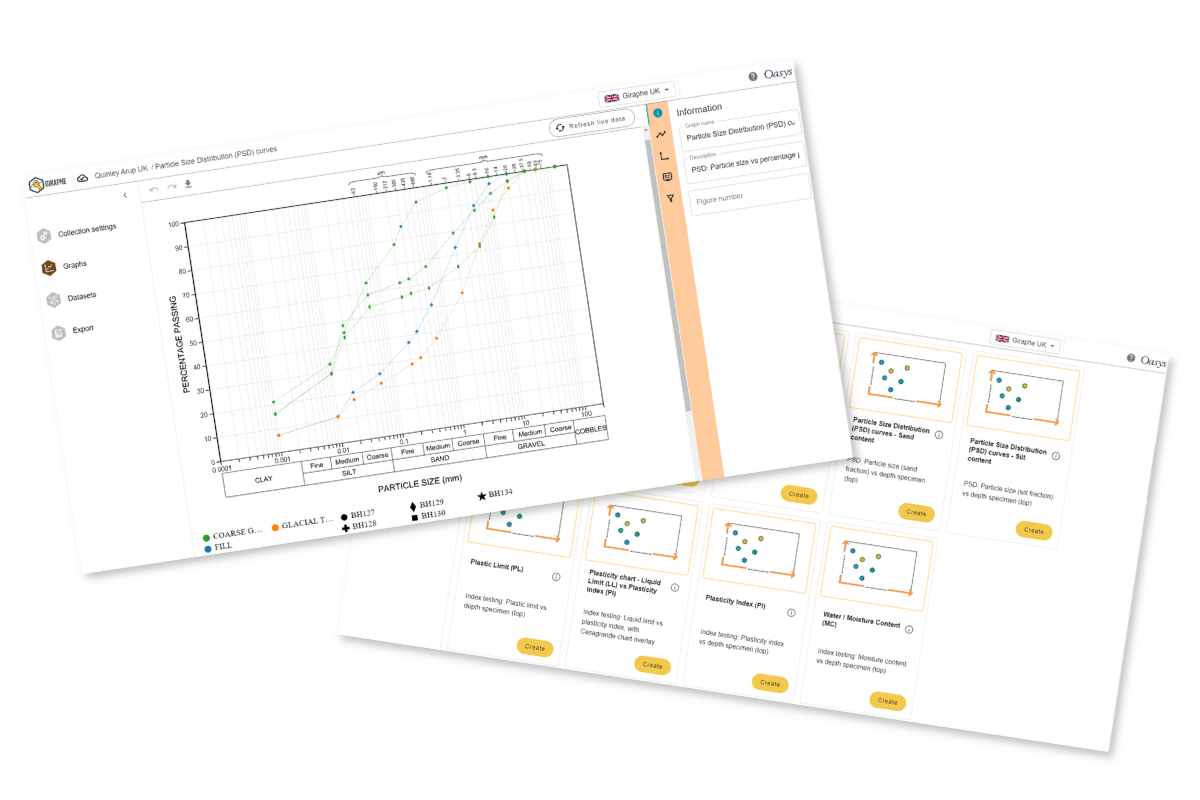
Smart, powerful and fast, Oasys Giraphe is our cloud-based dynamic graphing software, developed as part of a Technology Partnership with Seequent. Upgrade your workflows, save time over working in data tables and reduce inconsistencies with graphing reports across your entire organisation. From small projects working with CSV. files to major linear-infrastructure projects using OpenGround geotechnical information management solution, Giraphe has you covered.
Giraphe integrates seamlessly with OpenGround, providing users with a seamless, connected experience and centrally available data. By using OpenGround as a single source of truth for your data, Giraphe enables you to refresh data and update graphs on demand. Let Giraphe handle the complexity, so you can focus on what matters.
Core capabilities
With Giraphe you’re always on the latest version, meaning there’s no need for mass version updates. The integrated News tab will let you know of upcoming features. The Learn tab will show you how to utilise them for your own models.

Graph templates
A curated graph library that equips you with quick starting points for your graphs. You can arrange graphs in collections for easy reference, quick creation, editing and data refreshing.

Customisation options
Use ready-made templates or customise your own graphs with built-in tools. If using CSV. Files as data sources, Giraphe enables you to create graphs from scratch that are reuseable for other projects.

Early interpretation
Apply statistically generated trendlines on your dataset to help you visualise trends quickly and inform data-driven decisions with confidence.

Editable datasets
Adjust or redefine datasets to suit specific graphing requirements within a few clicks.

Export options
Export single graphs or an entire collection to scalable image file
SVG. or PDF. format ready for your reports.

OpenGround integration
Flexible graphing, data interpretation and refreshing to keep updated with data in your OpenGround projects.
Why choose Giraphe
Geotechnical graphing has never been so easy. Gone are the days of extracting data to create your own graphs on each project. Whether you’re working with in situ or lab results; geo-environmental or monitoring data, Giraphe’s graph library allows you to choose from a range of ready-made graph templates or build your own graph with our flexible display options.

Consistent graph reporting
Choose from the ever-growing library of graph templates or create your own graphs in a few clicks.

Enhances OpenGround's graphing capabilities
Enables users to query OpenGround API directly with pre-made templates, doing the hard work for you.

Collaboration
Share graphs with multiple users in view-only mode for review. Collaborate in edit-mode with individual users, facilitating feedback loops in the form of direct communication. This helps to reduce the noise, likelihood of errors and the number of iterations.

All-cloud software
Web-based dynamic graphing allows you to interact with and better understand your geotechnical data. The OpenGround integration is powered by cloud, allowing you to query, retrieve, interpret and visualise your project data seamlessly. Giraphe handles the finer details, saving time on graph set up and the need for rework. Reduce errors working digitally, without the need for external or offline data tables.
The future of geotechnical engineering
Why switch to cloud
The industry is clearly evolving, with digitalisation now central to how we design and deliver infrastructure.
From computational design to fully cloud-based tools, we are moving rapidly towards a more automated, connected future. We believe the industry needs to act now, not later, which is why we’re bringing cloud technology to our users. Cloud software keeps you up to date, reduces deployment and maintenance overheads, scales effortlessly for more demanding analyses, and frees up your local hardware by running on ours.
Catch up with the latest webinars

Geotechnical engineering
Dynamic geotechnical graphing made easy with Oasys Giraphe
Posted November 7th 2024
Watch this webinar where we reveal the latest enhancements to Oasys Giraphe! Since its launch, we’ve had fantastic conversations with users who have shared their…
Watch Now

Geotechnical engineering
Getting the most out of dynamic geotechnical graphing
22nd May 2025
Quick, easy, and high-standard: Maximising dynamic geotechnical graphing with Oasys Giraphe Join the Oasys Giraphe team as they unveil a whole host of new functionalities added…
Watch Now

Geotechnical engineering
How automation can transform project delivery in geotechnical engineering
27th November 2025
In this webinar, we took a trip down memory lane showcasing how our geotechnical engineering software has evolved over time. We explored how we have added…
Watch Now
Software support
Submit your support requests through the Customer Service Portal. You will need to use your Customer ID to log into the portal.
Tutorials and documentation
Find links to support, tutorials, documentation, and resources for all Oasys software products on the support page.
FAQs
Find answers quickly
Check the FAQs for quick answers to commonly asked questions. If you can’t find what you’re looking for, you’ll also find links to more detailed guidance and support.
Giraphe can be accessed anywhere with an internet connection on any modern device and operating system.
Training is available for Giraphe upon request. Submit the form below to speak to our team about arranging time with our specialists.
Speak to us about Giraphe
Get in touch today to speak to one of our team about any software support, tutorials or documentation.